MailOps
Get started
For On-call Engineers

Paged with the answer attached.

Alerts arrive with root cause, blast radius and a fix you can approve from the incident.

Get Started

How it works

From fog to fix

  1. 1

    The breaker trips

    Hard bounces spike past threshold on one vendor — traffic re-routes automatically.

  2. 2

    The model reads

    Bounce clusters are classified against vendor docs and recent routing changes.

  3. 3

    You get paged

    The alert carries the root cause, the evidence, and the proposed fix.

  4. 4

    One click closes it

    Approve the routing change; the audit trail writes itself.

Diagnoses in the alert

PagerDuty payloads with the AI root-cause write-up inline.

One-click approval

Fixes ship only after a human approves — from web or phone.

Full message journey

Every hop, header and SMTP reply, searchable in seconds.

The 3 a.m. bounce storm belongs to teams whose alerts carry their own diagnosis.

Incident review

The SendGrid reputation dip that customers never saw

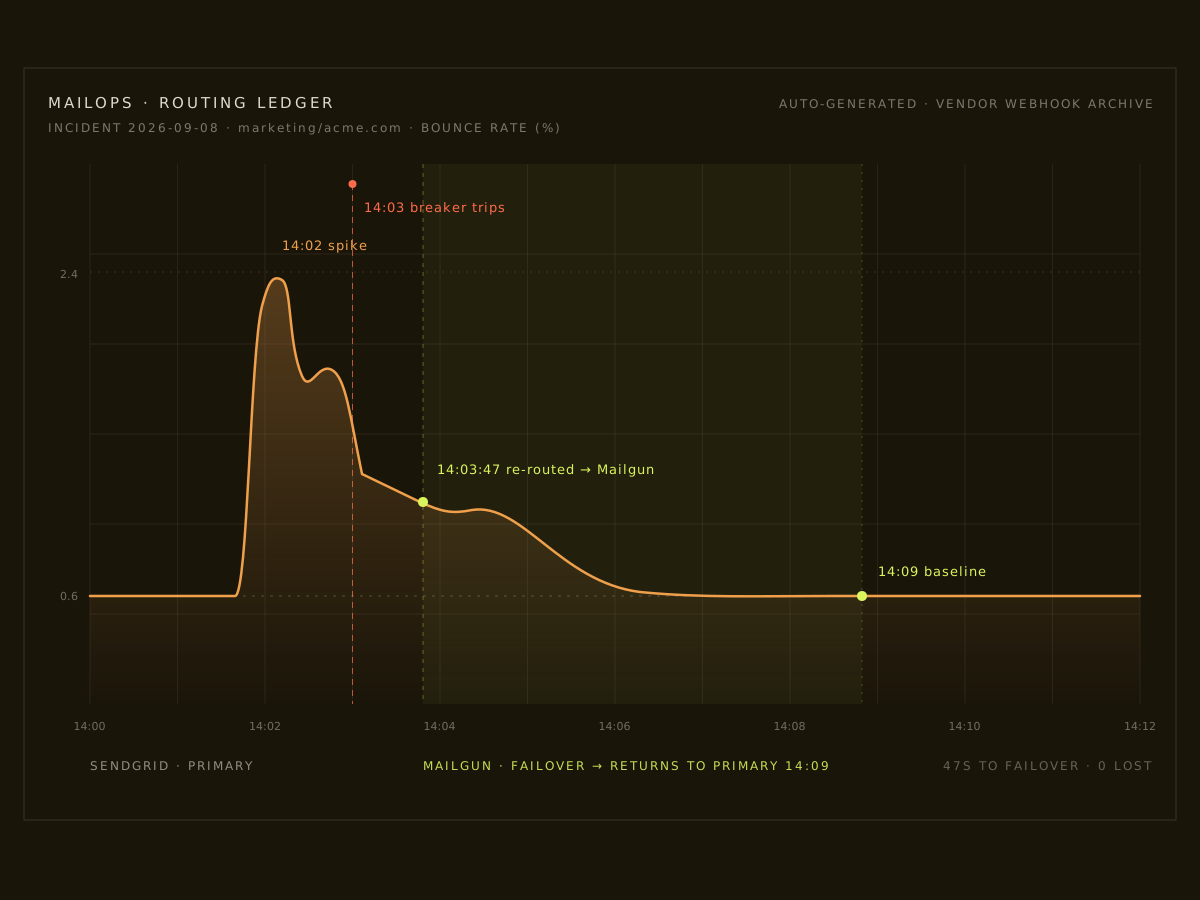
A bounce storm hit marketing traffic mid-campaign. The breaker tripped, TEM took the load, and AI had the postmortem drafted before the stand-up.

47s from spike to failover
0 customer tickets opened
100% of queued mail re-routed

Reconstructed from the routing ledger and vendor webhook archive for the week of the incident.

Routing-ledger chart of the bounce storm: spike at 14:02, breaker trip at 14:03, re-route to Mailgun at 14:03:47, baseline by 14:09
Fig. 01 — bounce storm absorbed: 47 seconds to re-route

Vendors

30+ vendors. One routing brain.

Every provider your stack speaks — SendGrid, Amazon SES, Mailgun, Postmark, Brevo, Mailjet, Resend, Scaleway TEM and more — sits behind one edge. When a circuit breaker trips, MailOps re-routes in under a minute and opens a diagnosis you can approve with one click.